FAF can't find game directory, even if I point to it Manjaro
-
So, basically, I've followed all of the steps listed here to install FAF on linux, yet when I try to open a game it gives me this error and his error.
I've been troubleshooting this for a while, and the only conclusion that I can come to is that it cannot find the game. I've changed the game directory in FAF to "/home/dankf/.steam/steam/steamapps/common/Supreme Commander Forged Alliance" which is where the exe for the game is, but it still doesn't work. Perhaps I have to make something the launches it through wine? I'm not sure.
Thanks, and if you need any more info, lemme know.
-
Best place to get help for setting up on Linux is in the discord under #Linux-support
-
Or we can use a platform that doesn't require signing up with Discord, is obviously ran by FAF, is easy to search and not ephemeral, like this forum

The error says it can't find
~/bin/faf. My ideas:- Check if the file is really there.
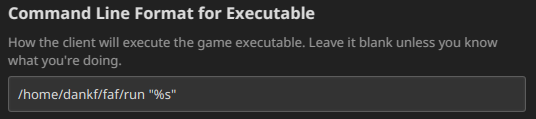
- Try replacing the '~' with your full home directory, probably
/home/your_username. It's possible that the client used to run the command with system shell and it does not anymore.
-
@mazornoob Changing the directory worked, thanks. I'm somewhat annoyed that it was just that easy, but thank you nonetheless!


Hello! It looks like you're interested in this conversation, but you don't have an account yet.
Getting fed up of having to scroll through the same posts each visit? When you register for an account, you'll always come back to exactly where you were before, and choose to be notified of new replies (either via email, or push notification). You'll also be able to save bookmarks and upvote posts to show your appreciation to other community members.
With your input, this post could be even better 💗
Register Login