FAForever Forums
    • Categories
    • Recent
    • Tags
    • Popular
    • Users
    • Groups
    • Login

    Updated Supreme Score Board (UI) Mod
    Scheduled Pinned Locked Moved Modding & Tools
    43 Posts 20 Posters 5.4k Views
    Loading More Posts
    • Oldest to Newest
    • Newest to Oldest
    • Most Votes
    Reply
    • Reply as topic
    Log in to reply
    This topic has been deleted. Only users with topic management privileges can see it.
    • S Offline
      Sheikah
      last edited by

      Hey Hussar one thing I noticed is that when playing with cheats supreme scoreboard removed the functionality where you can change the army you control by clicking on the name. Would be a nice QoL thing so I don't have to turn the scoreboard off for testing.

      1 Reply Last reply Reply Quote 0
      • Eternal-E Offline
        Eternal-
        last edited by Eternal-

        How do your mod affect to layouts of another UI elements? Looks like it breaks my Scaled Resource Panel
        i just did one import from common mod tools

        Profile | Eternal MOD pack | Check new client

        1 Reply Last reply Reply Quote 0
        • MachM Offline
          Mach
          last edited by

          so idk if you can do this via UI mod, but I notice that some people in aeolus ask how to mute someone ingame, so adding a mute button next to every player on scoreboard might be useful considering doing it via existing chat window is kinda complicated

          ResistanceR Sir-PrizeS 2 Replies Last reply Reply Quote 2
          • ResistanceR Offline
            Resistance @Mach
            last edited by

            @Mach see,the extreme bigbrain boy has got a point,make an ui that mutes people and so many problems will stop their existence

            queuing with a newbie to show him the beauty of tmm and meeting tagada be like:
            https://www.youtube.com/watch?v=yLcRpdZ0Xb0&ab_channel=Tomoko

            1 Reply Last reply Reply Quote 0
            • ArranA Offline
              Arran
              last edited by

              @HUSSAR can you add an option on SSB which makes SSB only active in replays?

              1 Reply Last reply Reply Quote 0
              • Sir-PrizeS Offline
                Sir-Prize @Mach
                last edited by

                @Mach said in Updated Supreme Score Board (UI) Mod:

                so idk if you can do this via UI mod, but I notice that some people in aeolus ask how to mute someone ingame, so adding a mute button next to every player on scoreboard might be useful considering doing it via existing chat window is kinda complicated

                There's a mod called Chat Mute in the vault where you can blacklist people before launching a game I think. You can also do it via settings in the chat window I believe.

                1 Reply Last reply Reply Quote 0
                • M Offline
                  Mielus
                  last edited by Mielus

                  The SSB mod seems broken since the last update of 26-07-2022, has anyone got it working?
                  Nevermind it was an other mod which broke: hotbuild overhaul. This prevented SSB from loading.

                  1 Reply Last reply Reply Quote 0
                  • Ctrl-KC Offline
                    Ctrl-K
                    last edited by

                    Nice oppotunity to try my scoreboard coming

                    “Be a yardstick of quality. Some people aren’t used to an environment where excellence is expected.”
                    — Steve Jobs.
                    My UI Mods
                    Support me

                    1 Reply Last reply Reply Quote 0
                    • Mr-SmithM Offline
                      Mr-Smith
                      last edited by

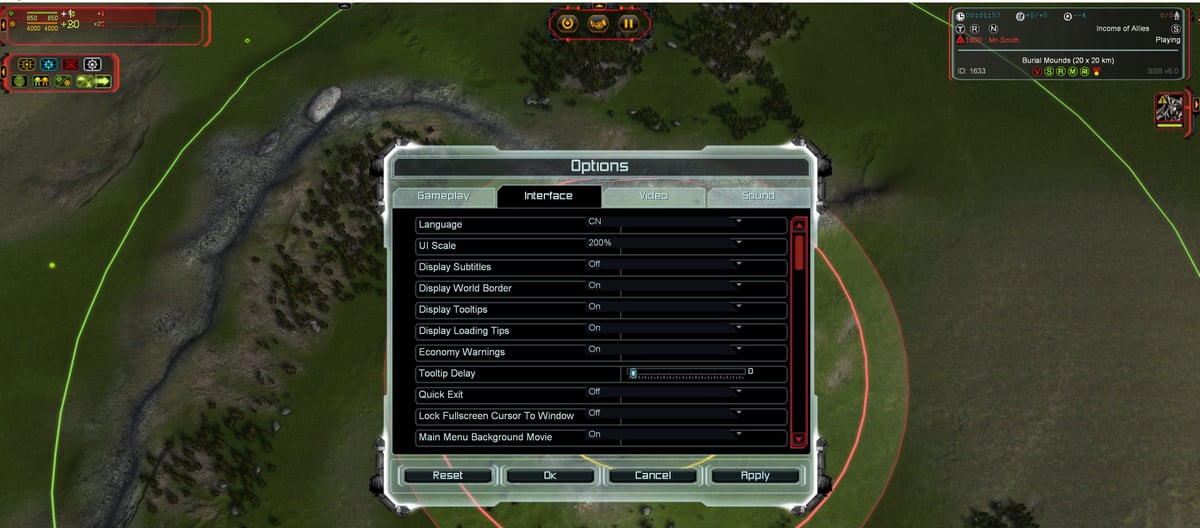
                      Screenshot 2022-08-20 103838.jpg

                      SSB kinda breaks my top left mass energy bars, playing in 4k with 200% UI scale,
                      also the options menu itself gets a bit shifted

                      https://youtu.be/a67tvWmu31Y?list=LL&t=181

                      1 Reply Last reply Reply Quote 0
                      • M Offline
                        macdeffy
                        last edited by

                        if you rename the economy_mini.lua file in c:\users<user>\Documents\My Games\Gas Powered Games\Supreme Commander Forged Alliance\Mods\SupremeScoreBoard\hook\lua\ui\game\layouts\ it will revert to the default FAF economy UI.

                        Or you might try the Scaled Resource Panel in vault, I believe i had to rename this file for me to be able to use both mods though.

                        I have not had any issues doing it this way.

                        1 Reply Last reply Reply Quote 0
                        • Ctrl-KC Offline
                          Ctrl-K
                          last edited by

                          Just remove this file

                          “Be a yardstick of quality. Some people aren’t used to an environment where excellence is expected.”
                          — Steve Jobs.
                          My UI Mods
                          Support me

                          1 Reply Last reply Reply Quote 0
                          • M Offline
                            martyjharris
                            last edited by

                            Thanks, great tip there!

                            1 Reply Last reply Reply Quote 0

                            Hello! It looks like you're interested in this conversation, but you don't have an account yet.

                            Getting fed up of having to scroll through the same posts each visit? When you register for an account, you'll always come back to exactly where you were before, and choose to be notified of new replies (either via email, or push notification). You'll also be able to save bookmarks and upvote posts to show your appreciation to other community members.

                            With your input, this post could be even better 💗

                            Register Login
                            • First post
                              Last post