FAForever Forums
    • Categories
    • Recent
    • Tags
    • Popular
    • Users
    • Groups
    • Login

    Game wont start

    Scheduled Pinned Locked Moved Game Issues and Gameplay questions
    38 Posts 8 Posters 1.4k Views
    Loading More Posts
    • Oldest to Newest
    • Newest to Oldest
    • Most Votes
    Reply
    • Reply as topic
    Log in to reply
    This topic has been deleted. Only users with topic management privileges can see it.
    • N Offline
      Nex
      last edited by

      Caused by: java.io.IOException: Cannot run program "C:\ProgramData\FAForever\bin\ForgedAlliance.exe" (in directory "C:\ProgramData\FAForever\bin"): CreateProcess error=740, The requested operation requires elevation
      

      Did you run the client as admin once? that might break things.
      try deleting the directory C:\ProgramData\FAForever and restart the client with your current user, then try to launch a game.

      C 2 Replies Last reply Reply Quote 0
      • C Offline
        CeasersMum @Nex
        last edited by

        @nex I did, I will give that a try

        1 Reply Last reply Reply Quote 0
        • C Offline
          CeasersMum @Nex
          last edited by

          @nex Unfortunately that didn't work. thank you for helping, is there anything else I can do?

          1 Reply Last reply Reply Quote 0
          • N Offline
            Nex
            last edited by

            So same error?
            try running the client as admin
            if that works it's definitely a permission issue, if that also doesn't work then there must be something else

            1 Reply Last reply Reply Quote 0
            • C Offline
              CeasersMum
              last edited by

              That worked but now its crashing
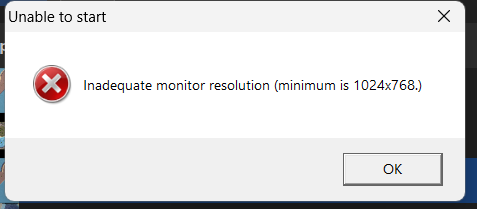
              514b4f2e-dcfd-4385-b3cf-3022dee73035-image.png

              1 Reply Last reply Reply Quote 0
              • N Offline
                Nex
                last edited by

                can you get a game log now?

                C 1 Reply Last reply Reply Quote 0
                • C Offline
                  CeasersMum @Nex
                  last edited by

                  @nex game_21158912.log

                  1 Reply Last reply Reply Quote 0
                  • N Offline
                    Nex
                    last edited by

                    mh nothing out of the ordinary in there
                    try deleting/renaming your game.prefs file
                    (found here)
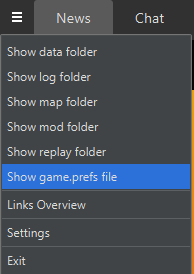
                    1de6f08b-dced-4509-b45c-400545e8ca89-image.png

                    Maybe the settings are corrupt
                    Then try to launch the game through steam once.

                    C 1 Reply Last reply Reply Quote 0
                    • C Offline
                      CeasersMum @Nex
                      last edited by

                      @nex I tried deleting it but that didn't work game_21158904.log

                      N 1 Reply Last reply Reply Quote 0
                      • N Offline
                        Nex @CeasersMum
                        last edited by

                        @ceasersmum isn't that log older than the other one?

                        Did starting it through steam work normally?

                        C 1 Reply Last reply Reply Quote 0
                        • C Offline
                          CeasersMum @Nex
                          last edited by

                          @nex That was the newest log I checked the time stamp on it. Yes opens completely normally and works through steam

                          1 Reply Last reply Reply Quote 0
                          • N Offline
                            Nex
                            last edited by

                            @ceasersmum mh just confused by the game number, which I thought count up and 12>04
                            but whatever.

                            mh can you get the most recent client log then?

                            Also since running as admin worked you should check the permissions on C:\ProgramData\FAForever and make sure you have read/write permissions there with your current user and you can execute the .exe in the bin/ folder.

                            1 Reply Last reply Reply Quote 0
                            • C Offline
                              CeasersMum
                              last edited by

                              I have managed to fix it. Thank you for your amazing help. I really appreciate it as I didn't know where to start. I was able to change the settings in the properties section of the programme that I had changed when trying to get it to stop minimizing and these were what was preventing it from loading. Thank you again!

                              N R 2 Replies Last reply Reply Quote 0
                              • N Offline
                                Nex @CeasersMum
                                last edited by

                                @ceasersmum ah cool.
                                Always a bit hard to do remote assistance without knowing what's going on everwhere.😅

                                1 Reply Last reply Reply Quote 1
                                • R Offline
                                  ReducedSep @CeasersMum
                                  last edited by

                                  @ceasersmum Hi, I'm having the same issue at the moment. What settings did you change to get it to work?

                                  MostLostNoobM 1 Reply Last reply Reply Quote 0
                                  • G Offline
                                    gvibes
                                    last edited by gvibes

                                    I am also having the same issue, thank you. Have already deleted everything (FAF and supcom) and reinstalled.

                                    The same error:
                                    Client Version: 2023.11.1
                                    java.lang.NullPointerException: Cannot invoke "java.lang.Process.onExit()" because "process" is null

                                    I think maybe the 2023.11 update initially failed in an odd and unrecoverable way, which seems like the root cause. I could not launch after the update so had to delete and reinstall everything to even launch the client.

                                    R 1 Reply Last reply Reply Quote 0
                                    • MostLostNoobM Offline
                                      MostLostNoob @ReducedSep
                                      last edited by

                                      @reducedsep @gvibes It was determined that there was an issue with the new managed Coturn server. That issue has been fixed & you should be able to play now

                                      R 1 Reply Last reply Reply Quote 0
                                      • R Offline
                                        ReducedSep @gvibes
                                        last edited by

                                        This post is deleted!
                                        1 Reply Last reply Reply Quote 0
                                        • R Offline
                                          ReducedSep @MostLostNoob
                                          last edited by

                                          @mostlostnoob True! All fixed, cheers

                                          1 Reply Last reply Reply Quote 0
                                          • G Offline
                                            gvibes
                                            last edited by

                                            Yep, I'm in, thanks.

                                            1 Reply Last reply Reply Quote 0

                                            Hello! It looks like you're interested in this conversation, but you don't have an account yet.

                                            Getting fed up of having to scroll through the same posts each visit? When you register for an account, you'll always come back to exactly where you were before, and choose to be notified of new replies (either via email, or push notification). You'll also be able to save bookmarks and upvote posts to show your appreciation to other community members.

                                            With your input, this post could be even better 💗

                                            Register Login
                                            • First post
                                              Last post