Game wont start
-
2023-11-08 12:23:44.466 INFO Created tray icon (c.faforever.iceadapter.util.TrayIcon:78)
2023-11-08 12:23:44.466 INFO Version: SNAPSHOT (com.faforever.iceadapter.IceAdapter:74)
2023-11-08 12:23:44.471 INFO Using GPGNET_PORT: 53790 (c.f.iceadapter.gpgnet.GPGNetServer:37)
2023-11-08 12:23:44.476 INFO Generated LOBBY_PORT: 25422 (c.f.iceadapter.gpgnet.GPGNetServer:42)
2023-11-08 12:23:44.477 INFO GPGNetServer started (c.f.iceadapter.gpgnet.GPGNetServer:55)
2023-11-08 12:23:44.478 INFO Creating RPC server on port 53789 (c.f.iceadapter.rpc.RPCService:40)
2023-11-08 12:23:44.480 INFO TCP Server started. (com.nbarraille.jjsonrpc.TcpServer:37)
2023-11-08 12:23:44.481 INFO RPC started (c.f.i.debug.TelemetryDebugger:113)
2023-11-08 12:23:44.575 INFO New client connected on port 53807 (c.nbarraille.jjsonrpc.SocketListener:38)
2023-11-08 12:23:44.576 INFO RPC connected (c.f.i.debug.TelemetryDebugger:114)
2023-11-08 12:23:44.577 INFO JJSON Peer listening (com.nbarraille.jjsonrpc.JJsonPeer:206)
2023-11-08 12:23:44.621 DEBUG LobbyInitMode set to normal (c.f.iceadapter.rpc.RPCHandler:56)
2023-11-08 12:23:44.621 INFO Sending Response:{"result":null,"id":0,"jsonrpc":"2.0"} (com.nbarraille.jjsonrpc.JJsonPeer:574)
2023-11-08 12:23:44.790 INFO Telemetry websocket opened (c.f.i.debug.TelemetryDebugger:55)
2023-11-08 12:23:47.373 WARN Invalid ICE server protocol: turns://fr-turn2.xirsys.com:443?transport=tcp (c.f.iceadapter.ice.GameSession:154)
2023-11-08 12:23:47.374 WARN Invalid ICE server protocol: turns://fr-turn2.xirsys.com:5349?transport=tcp (c.f.iceadapter.ice.GameSession:154)
2023-11-08 12:23:47.393 INFO Ice Servers set, total addresses: 5 (c.f.iceadapter.ice.GameSession:170)
2023-11-08 12:23:47.393 INFO Sending Response:{"result":null,"id":1,"jsonrpc":"2.0"} (com.nbarraille.jjsonrpc.JJsonPeer:574)
2023-11-08 12:23:47.445 DEBUG Pinged fr-turn2.xirsys.com with an RTT of 41.0 (c.f.iceadapter.util.PingWrapper:49)
2023-11-08 12:23:47.685 WARN Close requested, stopping... (c.f.iceadapter.rpc.RPCHandler:139)
2023-11-08 12:23:47.685 INFO close() - stopping the adapter (com.faforever.iceadapter.IceAdapter:158)
2023-11-08 12:23:47.687 INFO GPGNetServer stopped (c.f.iceadapter.gpgnet.GPGNetServer:253) -
This is what it says in the log
-
@ceasersmum That's an Ice-Adapter log (for debugging connection problems)
Game log should look something like this
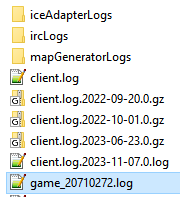
and you can just drag/drop the file into the reply window (no quick reply) then we get the whole file. -
@nex I don't have anything that looks like that
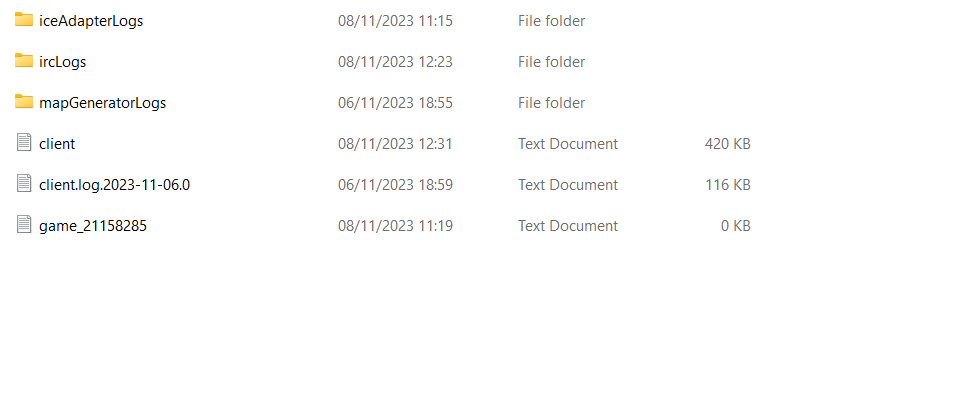
-
the bottom game one doesn't have anything in it
-
@ceasersmum
 Then drop the client log in here
maybe it contains some more info than what you posted -
-
-
Caused by: java.io.IOException: Cannot run program "C:\ProgramData\FAForever\bin\ForgedAlliance.exe" (in directory "C:\ProgramData\FAForever\bin"): CreateProcess error=740, The requested operation requires elevationDid you run the client as admin once? that might break things.
try deleting the directory C:\ProgramData\FAForever and restart the client with your current user, then try to launch a game. -
@nex I did, I will give that a try
-
@nex Unfortunately that didn't work. thank you for helping, is there anything else I can do?
-
So same error?
try running the client as admin
if that works it's definitely a permission issue, if that also doesn't work then there must be something else -
That worked but now its crashing
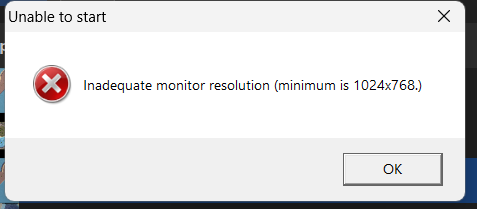
-
can you get a game log now?
-
-
mh nothing out of the ordinary in there
try deleting/renaming your game.prefs file
(found here)
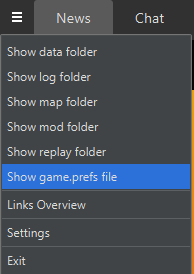
Maybe the settings are corrupt
Then try to launch the game through steam once. -
@nex I tried deleting it but that didn't work game_21158904.log
-
@ceasersmum isn't that log older than the other one?
Did starting it through steam work normally?
-
@nex That was the newest log I checked the time stamp on it. Yes opens completely normally and works through steam
-
@ceasersmum mh just confused by the game number, which I thought count up and 12>04
but whatever.mh can you get the most recent client log then?
Also since running as admin worked you should check the permissions on C:\ProgramData\FAForever and make sure you have read/write permissions there with your current user and you can execute the .exe in the bin/ folder.
Hello! It looks like you're interested in this conversation, but you don't have an account yet.
Getting fed up of having to scroll through the same posts each visit? When you register for an account, you'll always come back to exactly where you were before, and choose to be notified of new replies (either via email, or push notification). You'll also be able to save bookmarks and upvote posts to show your appreciation to other community members.
With your input, this post could be even better 💗
Register Login