Crash at gamestart.(update Graphic drivers)
-
Hi. Everytime I tried to start a game, I got the following error message:
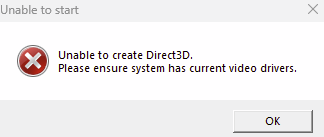
Any "how to" for me pls?
(My graphic drivers are always updated)
-
What is your OS and PC specs?
-
Win 11
I9 10980 XE
64BG RAM
RTX 3090 -
One verifie steam files
2 have you lauched the game via steam first -
Yes I tried to launch it in steam first
-
Maybe its important that I have the Samsung G9 monitor (32:9)
-
You can work through those threads on steam - Some people had the same issue, maybe it is related to your resolution: https://steamcommunity.com/app/9420/discussions/0/3050611107163611423/
-
hmmm. I think there´s no solution. I don´t know. I think I give up. Thx for answering so quickly...
-
Hey guys. I found the solution. I only had to force the game to start windowed.
In steam rightclick on supreme commander FA --> Properties and write in Startoption :
/windowed 1920 1080
...for HD Resolution. in my case it was:
/windowed 5120 1440


Hello! It looks like you're interested in this conversation, but you don't have an account yet.
Getting fed up of having to scroll through the same posts each visit? When you register for an account, you'll always come back to exactly where you were before, and choose to be notified of new replies (either via email, or push notification). You'll also be able to save bookmarks and upvote posts to show your appreciation to other community members.
With your input, this post could be even better 💗
Register Login