FAForever Forums
    • Categories
    • Recent
    • Tags
    • Popular
    • Users
    • Groups
    • Login

    faf not starting - cartographic.fx reason: unknown error

    Scheduled Pinned Locked Moved FAF support (client and account issues)
    7 Posts 4 Posters 359 Views
    Loading More Posts
    • Oldest to Newest
    • Newest to Oldest
    • Most Votes
    Reply
    • Reply as topic
    Log in to reply
    This topic has been deleted. Only users with topic management privileges can see it.
    • Z Offline
      Zmijacek
      last edited by

      Hi guys, I installed FAF on new PC with steam version of Supreme FA. I tried to start FAF but I received error all the time. I tried to find solution with uncle google, I found some advices (path to right folder, delete programdata etc..), I think I tried everything but nothing helped. I am able to start Supreme FA from steam without any issue, but via FAF nope.
      AMD 5600G, RX 6700 XT (last version of drivers), Win 10
      Pls help
      game_17402348.log

      1 Reply Last reply Reply Quote 0
      • Ctrl-KC Offline
        Ctrl-K
        last edited by

        Have you ever started a vanilla game?

        โ€œBe a yardstick of quality. Some people arenโ€™t used to an environment where excellence is expected.โ€
        โ€” Steve Jobs.
        My UI Mods
        Support me

        1 Reply Last reply Reply Quote 0
        • Z Offline
          Zmijacek
          last edited by

          Yes I have

          1 Reply Last reply Reply Quote 0
          • maggeM Offline
            magge Global Moderator
            last edited by

            Just to be sure; You have pointed the game location in FAF correctly, right?
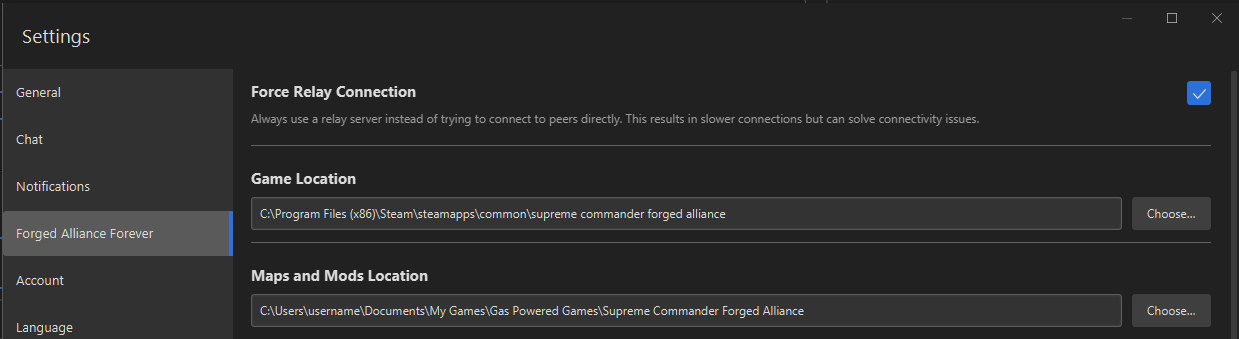
            1ea4c06c-e2e2-48b0-be27-10d974d07be7-image.png

            Want to become a Moderator? || Open volunteer positions
            1 Reply Last reply Reply Quote 0
            • Z Offline
              Zmijacek
              last edited by

              Yes I have. I tried delete programdata, start as admin, rename supremecommander.exe to forgedalliance.exe etc..

              I player FAF on another PC but on this new machine I am not able to solve it

              1 Reply Last reply Reply Quote 0
              • JipJ Offline
                Jip
                last edited by

                The file cartographic.fx is the first shader to be loaded, the error being unknown means:

                • there is a driver issue, but the steam version works so it is likely not that
                • the .nx2 that contains the shader (effects.nx2) is corrupted somehow
                • your anti virus is blocking access to the .nx2 (effects.nx2) somehow

                I suspect it is one of the last two

                A work of art is never finished, merely abandoned

                1 Reply Last reply Reply Quote 0
                • Z Offline
                  Zmijacek
                  last edited by

                  1. I tried to install different amd drivers, even one year old
                  2. FAF reinstalled
                  3. I dont have any standalone AV or FW, just WIN builded, I turned them off

                  nothing helped
                  I just not tried reinstall windows ๐Ÿ˜•

                  1 Reply Last reply Reply Quote 0

                  Hello! It looks like you're interested in this conversation, but you don't have an account yet.

                  Getting fed up of having to scroll through the same posts each visit? When you register for an account, you'll always come back to exactly where you were before, and choose to be notified of new replies (either via email, or push notification). You'll also be able to save bookmarks and upvote posts to show your appreciation to other community members.

                  With your input, this post could be even better ๐Ÿ’—

                  Register Login
                  • First post
                    Last post