UI scaled too far
-
Hello friends,
I tried the settings ui-scale to 150%, but now my screen is zoomed in so much that I can't even start a game.
How do I revert this?
Are there settings stored somewhere in a file that I can edit? Doing it via the context menu is impossible, as I cannot open it from in-game. Please help, I want to play ... -
search for your Game.prefs file:
C:\Users\Uveso\AppData\Local\Gas Powered Games\Supreme Commander Forged Alliance\Game.prefsOpen it and search for:
ui_scale = xyz,and change it to:
ui_scale = 1,save the file, start the game.
-
@zxq2 How are you able to set the ui-scale to 150%?? mine is tiny and I can't figure out how to adjust it.
I found the Game.prefs file but it doesn't have anything about UI scale in the file.
-
you can add the line to game.prefs, but the in-game option, is options -> interface -> third line down
-
I also have the same problem: there isn't any ui_scale entries and can't access to the options, or I don't know how to open it
-
Can you double-check that you really do not have that following option?
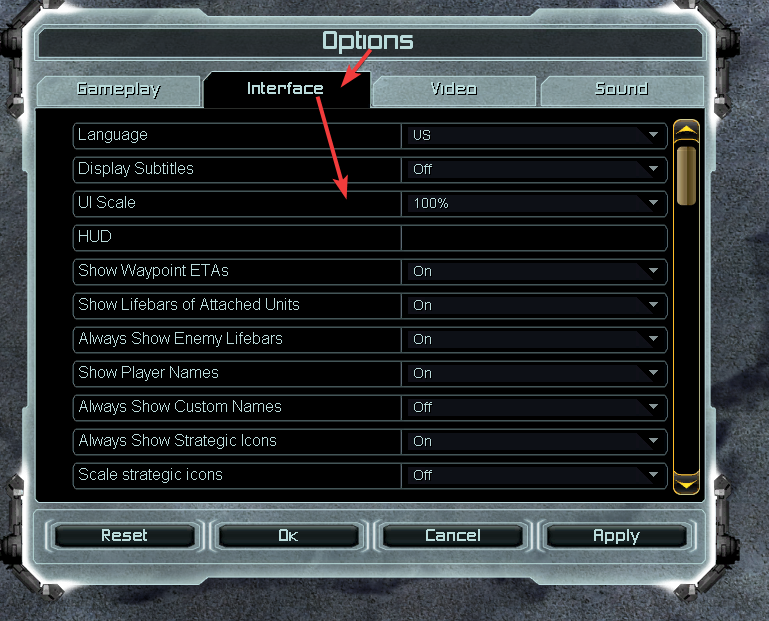
-
I can't start a custom game, so I does not have access to the option section
-
Can you make an own thread and share some logs (if any exist) and your prefs.file, please? It seems you may have several issues that need to be narrowed down separately.
-
My problem is exactly the same as Looper's. If you think so, I can make another thread


Hello! It looks like you're interested in this conversation, but you don't have an account yet.
Getting fed up of having to scroll through the same posts each visit? When you register for an account, you'll always come back to exactly where you were before, and choose to be notified of new replies (either via email, or push notification). You'll also be able to save bookmarks and upvote posts to show your appreciation to other community members.
With your input, this post could be even better 💗
Register Login