Maps and mods
-
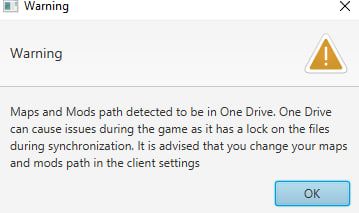 im cant install maps and play any games.
its problem start 1 year ago and im cant play -
@blackhart All versions of SCFA have a difficult time with using network storage systems like OneDrive, Dropbox, etc..
To get around this for FAF, you'll need to:
- go to FAF client > top left menu > Settings > Forged Alliance Forever > Maps and Mods Location > Choose...
- navigate to a location outside of OneDrive
- either select an already existing folder or create a new folder for where FAF will store your maps/mods & then select the new folder
- double-check the new path to ensure that it's not in OneDrive
-
This post is deleted!


Hello! It looks like you're interested in this conversation, but you don't have an account yet.
Getting fed up of having to scroll through the same posts each visit? When you register for an account, you'll always come back to exactly where you were before, and choose to be notified of new replies (either via email, or push notification). You'll also be able to save bookmarks and upvote posts to show your appreciation to other community members.
With your input, this post could be even better 💗
Register Login