FAForever Forums
    • Categories
    • Recent
    • Tags
    • Popular
    • Users
    • Groups
    • Login

    Any way to stop the recurring appearance of "don't run as administrator" dialogue box

    Scheduled Pinned Locked Moved I need help
    21 Posts 7 Posters 976 Views
    Loading More Posts
    • Oldest to Newest
    • Newest to Oldest
    • Most Votes
    Reply
    • Reply as topic
    Log in to reply
    This topic has been deleted. Only users with topic management privileges can see it.
    • ? Offline
      A Former User @Brutus5000
      last edited by

      @brutus5000 How?

      1 Reply Last reply Reply Quote 0
      • ZLOZ Offline
        ZLO
        last edited by

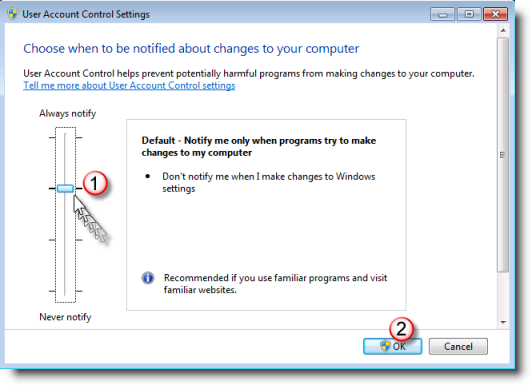
        Enable UAC (this is what recommended by microsoft)
        a10df901-f36f-43ca-b096-c6b4dc5f84e3-image.png
        This can already be enough to solve the problem
        Then make sure that users have rights to "C:\programdata\faforever" folder
        or just delete it and the problem should no longer appear, FAF should redownload files with correct settings

        TA4Life: "At the very least we are not slaves to the UI" | http://www.youtube.com/user/dimatularus | http://www.twitch.tv/zlo_rd

        MachM 1 Reply Last reply Reply Quote 1
        • MachM Offline
          Mach @ZLO
          last edited by

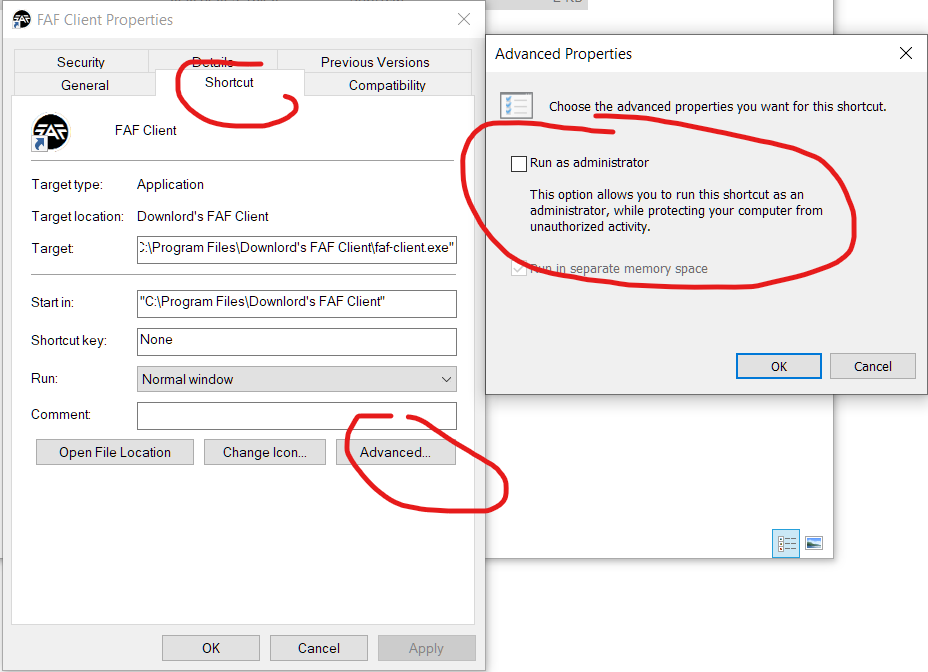
          is this dialogue box a client thing or a windows thing, because I can't find any other program that does this to find a solution? just to be sure I am talking about this:

          alt text

          ? 1 Reply Last reply Reply Quote 0
          • ? Offline
            A Former User @Mach
            last edited by

            @mach I solved this following the Zlo's post.

            1 Reply Last reply Reply Quote 0
            • MachM Offline
              Mach
              last edited by

              unfortunately I already had it set like that and it still pops up

              ZLOZ 1 Reply Last reply Reply Quote 0
              • ZLOZ Offline
                ZLO @Mach
                last edited by

                @mach did you try to delete FAForever folder from programdata?
                (or can move it if you care about content of it, like replays or custom strategic icons)

                TA4Life: "At the very least we are not slaves to the UI" | http://www.youtube.com/user/dimatularus | http://www.twitch.tv/zlo_rd

                MachM 1 Reply Last reply Reply Quote 0
                • MachM Offline
                  Mach @ZLO
                  last edited by

                  @zlo said in Any way to stop the recurring appearance of "don't run as administrator" dialogue box:

                  @mach did you try to delete FAForever folder from programdata?

                  I just did but same thing happens when I open FAF afterwards

                  1 Reply Last reply Reply Quote 0
                  • ? Offline
                    A Former User
                    last edited by A Former User

                    I store all data on disk D, so I succeeded on the pressing-the-OK-button step.

                    1 Reply Last reply Reply Quote 0
                    • K Offline
                      Katharsas
                      last edited by

                      @Mach
                      Make sure to rightclick the shortcut (what you double click) and make sure the admin option is disabled:
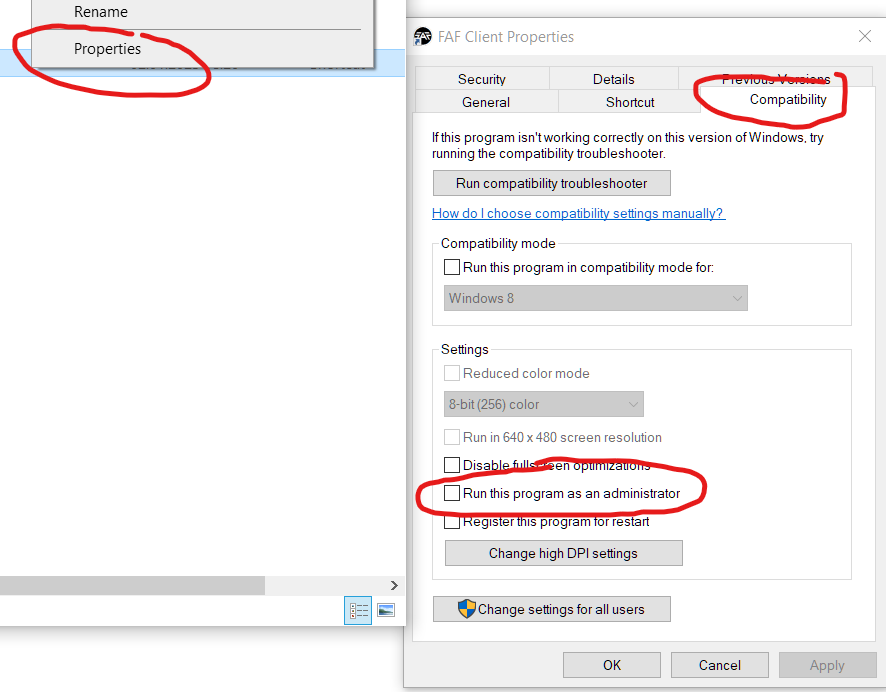
                      Screenshot 2023-02-08 002616.png

                      1 Reply Last reply Reply Quote 0
                      • MachM Offline
                        Mach
                        last edited by

                        it is unchecked

                        1 Reply Last reply Reply Quote 0
                        • K Offline
                          Katharsas
                          last edited by

                          Ok then pls also check this one:
                          a45b7a22-ee8a-43f6-a22b-7c985c81d783-image.png

                          If that does not help then i would say your windows or FAF install has been fiddled with by some third party program (any "Tuning" programs or similar running?) in a bad way.

                          1 Reply Last reply Reply Quote 0
                          • MachM Offline
                            Mach
                            last edited by

                            oh I dont have that tab, I was using the .exe itself, not a shortcut

                            1 Reply Last reply Reply Quote 0
                            • K Offline
                              Katharsas
                              last edited by

                              Well, either your security permissions are messed up, or you have third party software messing something up.

                              On a default windows installation your applications never run as admin unless the app itself is reqeusting admin rights, which the FAF client does not do.

                              1 Reply Last reply Reply Quote 0

                              Hello! It looks like you're interested in this conversation, but you don't have an account yet.

                              Getting fed up of having to scroll through the same posts each visit? When you register for an account, you'll always come back to exactly where you were before, and choose to be notified of new replies (either via email, or push notification). You'll also be able to save bookmarks and upvote posts to show your appreciation to other community members.

                              With your input, this post could be even better 💗

                              Register Login
                              • First post
                                Last post