Crash in every game
-
Hello
My game crashes every time I try to play, usually within the first 10-20 minutes, both on default and FAF Develop game type. I'm playing on Windows.
game_15683587.log
debugger.txt -
warning: SND: Error playing cue 1 on bank 5 [music]
XACT: Invalid argThese error messages will eventually cause your game to crash.
You're throwing sound errors - SCFA does not support surround sound - you must set your audio hardware to stereo.
-
Unless I'm missing something my audio is already set to stereo, here are my settings:
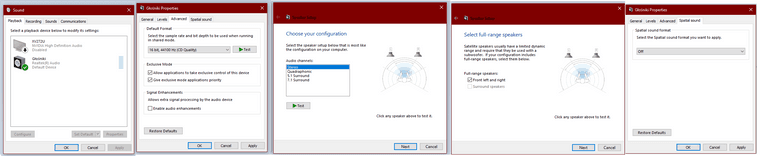
-
I'll bet you have the little Realtek sound utility in your toolbar.....it will be the culprit - as it does a little bit of post-processing of it's own.
-
I removed it, and some Nvidia audio stuff, but I'm still crashing with those XACT errors. I don't think that I have any more audio altering programs left. What should I try next?
-
Have a look at some of the other threads on this same topic: at this point you might have to try deleting the prefs file, disabling the sound by editing the shortcut link or deleting the sound files entirely (make a backup in that case).
Hello! It looks like you're interested in this conversation, but you don't have an account yet.
Getting fed up of having to scroll through the same posts each visit? When you register for an account, you'll always come back to exactly where you were before, and choose to be notified of new replies (either via email, or push notification). You'll also be able to save bookmarks and upvote posts to show your appreciation to other community members.
With your input, this post could be even better 💗
Register Login