FAF client create game error 1.4.6, 1.4.7
-
Crush when Create game.
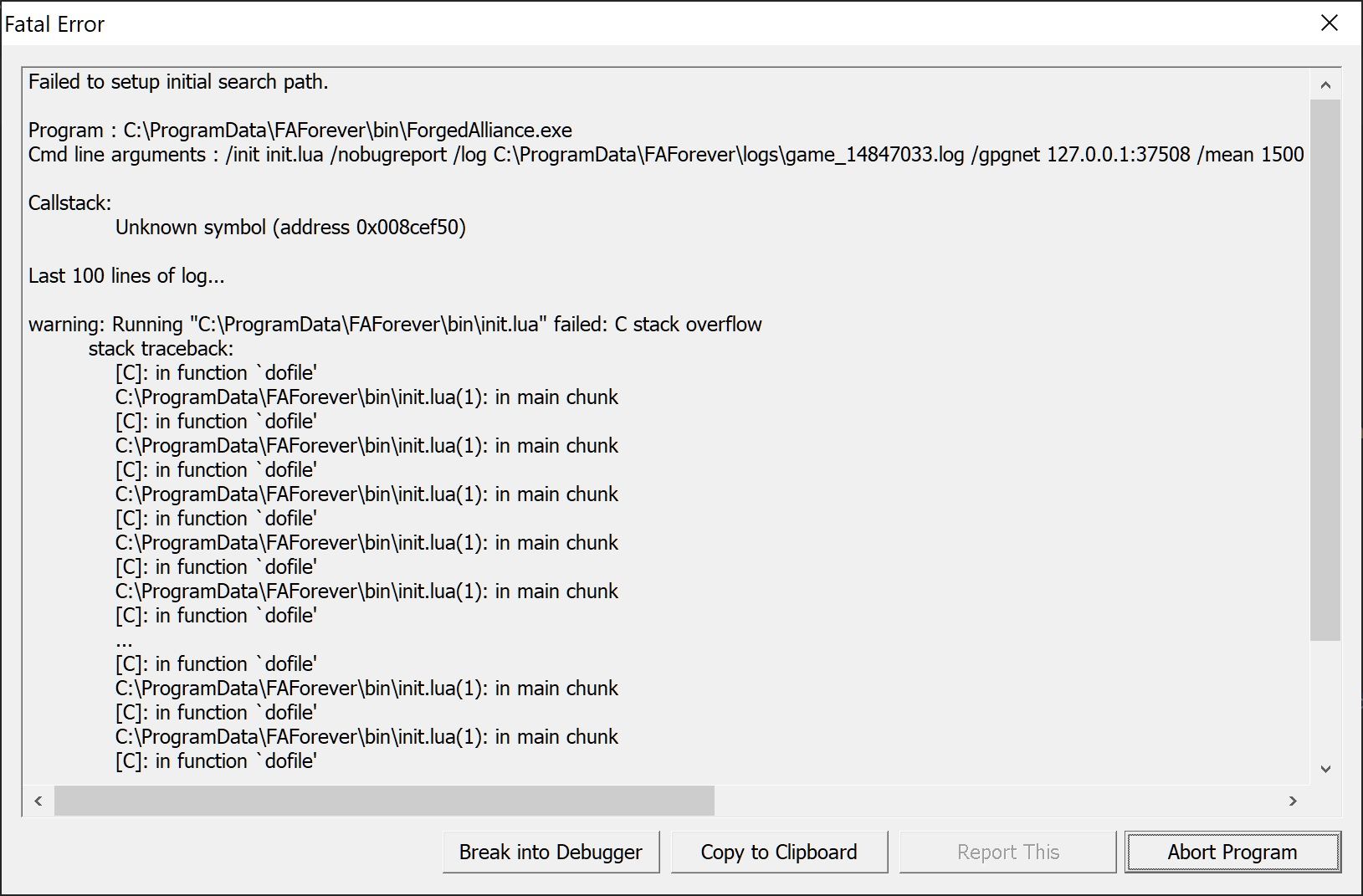
The game run Ok-ish for 1 month with version 1.4.6, sometime crashes because of some mods after 30mins, other time crash when exit to windows.
It was playable, now it can't be run.More info:
versions tested = 1.4.6, 1.4.7
reinstall = yes
update before error = false
modifications before error = download 2 maps with FAForever
mods:
blackops faf acus
blackops faf exunits
blackops faf unleashed
brewlan
brewlan additional unit mods
nuclear repulsor shields
quantum resource generators
total mayhem
game type = FAF Develop
map = finn's revenge
FAForever installed path = D:\Apps\Downlord's FAF Client
supreme commander forged alliance installed path = D:\Apps\Steam\steamapps\common\Supreme Commander Forged Alliance
default mods tested = true
Attach files:
game_14846979.log
Error.txtPS: I didn't try to reinstall vanilla game, i reinstalled just the FAForever client.
Late: It seems that even vanilla game crash on start: remain "...IN TRANSIT...".
Why after downloading 2 maps all crash? The maps supposed to be downloaded to FAForever and not touch or destroy vanilla game.
Game.prefs.txt
SupCom.sclog.txt -
Please post the full game log, not only the last 100 lines.
I can't see where your maps folders (you have 3) are located.info: Loading script file: \000/maps/SCMP_019/SCMP_019_script.lua info: Sim::Create() crashed: attempt to get as int a table valueDelete map maps/SCMP_019 from you map folder.
(not the original map from the game/maps folder!) -
Hi @uveso,
Maps folders are in paths:
- D:\Apps\Steam\steamapps\common\Supreme Commander Forged Alliance\maps - here is vanilla game;
- %USERDATA%\Documents\My Games\Gas Powered Games\Supreme Commander Forged Alliance\maps - this is from FAForever client i supose
The map SCMP_019 folder is just on original game folder: D:\Apps\Steam\steamapps\common\Supreme Commander Forged Alliance\maps, so i cannot delete this folder.
I have attached full files:
- game_14846979.log that was generated on crash (full file), path C:\ProgramData\FAForever\logs;
- Error.txt exception that was generated on crash(full text);
- SupCom.sclog (full file), path %USERDATA%\AppData\Local\Gas Powered Games\Supreme Commander Forged Alliance;
Now i will attach:
- client.log, path C:\ProgramData\FAForever\logs;
client.log - irc.log, path C:\ProgramData\FAForever\logs;
irc.log
What file do you need for game log? I don't have any more log files to send.
PS: I didn't send just last 100 lines, i post full log files.
-
you are using FAFdevelop, can you try the normal FAF please ?
I got the same error, looks like the developbranch is shipping a wrong init.lua file. -
Could you please try the develop version again ?
Should be fixed now. -
Now i will never ever play in develop version again and i will backup the folder to be sure that no one will break my game.
-
hello, thanks for your report. We were able to fix the issue thanks to your help.
-
Anytime.
Glad to help.
Keep up the good work.

Hello! It looks like you're interested in this conversation, but you don't have an account yet.
Getting fed up of having to scroll through the same posts each visit? When you register for an account, you'll always come back to exactly where you were before, and choose to be notified of new replies (either via email, or push notification). You'll also be able to save bookmarks and upvote posts to show your appreciation to other community members.
With your input, this post could be even better 💗
Register Login