Stoping a units movement without altering the command que
-
Is there a way to prevent a unit from moving or null out its movement, without changing the units prior commands?
I ask as I'm seeing issues with teleporting units, where sometimes they are being thrown beyond the intended destination. Using self:SetImmobile(true) prior to the teleport doesnt help. The teleport destination is good as i can see the warp-in effects at the location selected. Just the unit (randomly) shoots over and past the destination.
Kykhu Oss https://youtu.be/JUgyGTgeZb8
Unit Thrower https://youtu.be/iV8YBXVxxeI
Beam Tentacle https://youtu.be/le5SNwHvC4c
Blackhole https://www.youtube.com/watch?v=D9NGQC5rr0c
Resurection https://www.youtube.com/watch?v=WdbIQ4vHkMs -
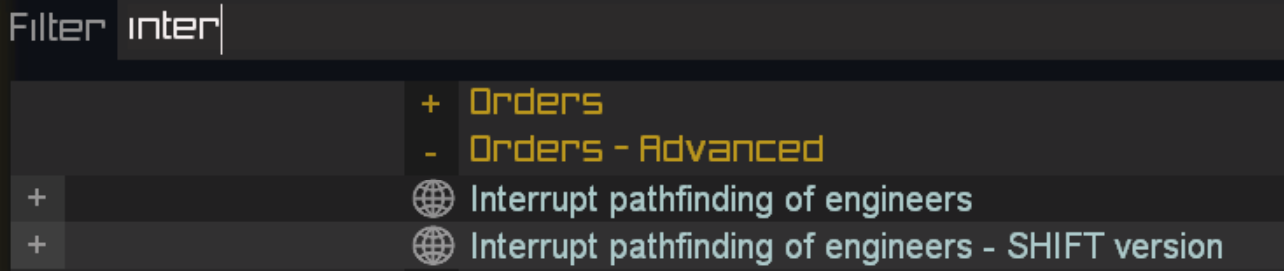
alt-right-click (or was it alt-right-shift-click? I forgot) to remove the movement command's path node it's executing?
-
@resin_smoker There's already a key bind for that regarding engineers. I think it also works on units loading into a transport, but don't quote me on that.
-
Thanks but, maybe i should of mentioned that this is being performed within the units lua, not via the games UI.
Have a look...
Init_Shadow_Step = function(self, target) if myDebug then WARN('Init_Shadow_Step, Target: ', target:GetBlueprint().BlueprintId or 'failed to pull Blueprint for target unit') end if not self:IsDead() then --Get the location and size data local myPos = self:GetPosition() if myDebug then WARN(' myPos: '..repr(myPos)) end local tPos = target:GetPosition() if myDebug then WARN(' tPos: '..repr(tPos)) end local mSizeZ = self:GetBlueprint().SizeZ if myDebug then WARN(' My Size Z: ', mSizeZ) end local tSizeZ = target:GetBlueprint().SizeZ if myDebug then WARN(' Target Size Z: ', tSizeZ) end --Calc dist to target local tDist = VDist2(myPos[1], myPos[3], tPos[1], tPos[3]) local wpnMax = self:GetWeaponByLabel('DoubleLaser'):GetBlueprint().MaxRadius local minRange = wpnMax if myDebug then WARN(' Mix range: ', minRange,' Target dist: ', tDist) end local maxRange = wpnMax * 3 if myDebug then WARN(' Max range: ', maxRange,' Target dist: ', tDist) end local sizeAdjDist = (tSizeZ + mSizeZ * 5) - tDist if myDebug then WARN(' Adjusted teleport distance: ', sizeAdjDist) end --Only warp out if within the right range if tDist > minRange and tDist <= maxRange then --Set the flag so that the warp can not happen more than once without first running Warpclock self.WarpReady = false --Prep the unit for warp self:SetImmobile(true) self:PlayUnitSound('WarpOut') self:PlayTeleportOutEffects() self:HideBone(0, true) self:SetVizToAllies('Never') self:SetVizToFocusPlayer('Never') self:SetVizToNeutrals('Never') self:SetVizToEnemies('Never') --Snap our unit to face towards the target (can act buggy at times, hence the delay before the warp takes place) local vector = utilities.GetDirectionVector(tPos, myPos) if myDebug then WARN(' vector: '..repr(vector)) end self:SetOrientation( OrientFromDir( vector ),true) --Keep the unit from dying during the transition self:SetCanTakeDamage(false) WaitTicks(5) local checkPos = nil local warpPos = nil local terrain = nil --These checks ensure that our unit can path to the warp location and that its destination isn't below the ground while self and not checkPos do warpPos = self:CalculateWorldPositionFromRelative({ utilities.GetRandomFloat(-5.0, 5.0), 0.1, -sizeAdjDist }) if myDebug then WARN(' warpPos: ', warpPos[1], warpPos[2], warpPos[3]) end terrain = GetTerrainHeight(warpPos[1], warpPos[3]) if myDebug then WARN(' terrain height ', terrain) end if terrain > warpPos[2] then if myDebug then WARN(' adj warpPos height') end warpPos[2] = terrain + 0.1 end checkPos = import('/lua/AI/aiutilities.lua').CheckUnitPathingEx(warpPos, myPos, self) WaitTicks(Random(1,2)) end --Violently warp in if myDebug then WARN(' WARP!') end Warp(self, warpPos, OrientFromDir( vector )) self:StopUnitAmbientSound('AmbientMove') self:PlayUnitSound('WarpIn') self:PlayTeleportInEffects() for k, v in self.WarpFxFiles do CreateAttachedEmitter(self, 'url0305', self:GetArmy(), v ):ScaleEmitter(2.0):OffsetEmitter(0,-0.5,0) end self:ShakeCamera(2, 1, 0.5, 0.5) DamageRing(self, warpPos, 1, 5, 250, 'Force', false) self:ShowBone(0, true) self:SetVizToAllies('Always') self:SetVizToFocusPlayer('Always') self:SetVizToNeutrals('Always') self:SetVizToEnemies('Intel') self:SetCanTakeDamage(true) self:SetImmobile(false) else --Warp was aborted due to improper distance to target, so reseting the flag if myDebug then WARN(' Warp aborted due to ranged') end end end if not self.WarpReady then --Restart warp engine self:ForkThread(self.WarpClock) end end, -
You can retrieve the navigator and call
AbortMove, see also the implementation of the hotkey in the sim side. -
@jip Weill I'm not trying to cancel a move per say as I am attempting to keep the unit from being thrown as a result of a bad teleport. Maybe I should make a video as its rather hard to explain.
-
Video of the error: https://youtu.be/qOmSMJ8YfSE
In the meantime, I'll try using self:GetNavigator():AbortMove() as you've suggested.
-
No dice with self:GetNavigator():AbortMove()....
Looks like I may need to create a safety code to ensure the unit doesn't get thrown under the ground. Possibly to recall it to its original position, or outright destroy it.
-
Ok correction.... Performing self:GetNavigator():AbortMove() before the Warp, not afterwards is whats required. Not seen it fail yet but I may need to script in a function to remove it from under the ground, should it get stuck.



Hello! It looks like you're interested in this conversation, but you don't have an account yet.
Getting fed up of having to scroll through the same posts each visit? When you register for an account, you'll always come back to exactly where you were before, and choose to be notified of new replies (either via email, or push notification). You'll also be able to save bookmarks and upvote posts to show your appreciation to other community members.
With your input, this post could be even better 💗
Register Login