FAF Client crashes on launch / Startup error
-
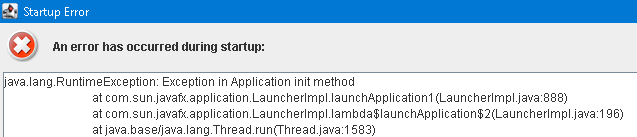
Unfortunately it didn't work, there is still the same pop up with Startup Error with the text again as long as before.
Before I installed Supreme Commander FA I had problems with launching the first version of Supreme Commander, that's why I bought SC FA which works.
Does this problem perhaps also have something to do with this?
Or what else could I try to run FAF?Thank you for your support @MostLostNoob

-
@anybody00 Can you open Run (Windows + R) & go to the following:
%USERPROFILE%/AppData\Roaming\Forged Alliance Forever\logsIf there's a
client.logfile in there, then please click the Reply button at the bottom of this page between the (View) icon & the "Mark unread" button. Next, drag/drop that client.log file into the Reply message window so those that can help (most likely not me) have that data to look at.
 -
There's just a client.prefs file in
%USERPROFILE%/AppData\Roaming\Forged Alliance Forever\
i'm not able to drop into this box:[client.prefs](Invalid file type. Allowed types are: .png, .jpg, .bmp, .txt, .log, .gif, .webp, .csv, .pdf, .xls, .doc, .zip, .7z, .rar, .dds, .jpeg)
There aren't any hidden fils as well, I have this programm called TOTAL CMD64 which would show me any hidden fils.
I'm not sure if this helps buthere is the Text from client.prefs:
{
"general" : {
"disableSteamStart" : false,
"showCyrillicWarning" : true
},
"data" : {
"baseDataDirectory" : "C:\ProgramData\FAForever",
"binDirectory" : "C:\ProgramData\FAForever\bin",
"replaysDirectory" : "C:\ProgramData\FAForever\replays",
"languagesDirectory" : "C:\ProgramData\FAForever\languages",
"replayDataDirectory" : "C:\ProgramData\FAForever\replaydata",
"replayBinDirectory" : "C:\ProgramData\FAForever\replaydata\bin",
"corruptedReplaysDirectory" : "C:\ProgramData\FAForever\replays\corrupt",
"themesDirectory" : "C:\ProgramData\FAForever\themes",
"mapGeneratorDirectory" : "C:\ProgramData\FAForever\map_generator",
"cacheDirectory" : "C:\ProgramData\FAForever\cache",
"cacheStylesheetsDirectory" : "C:\ProgramData\FAForever\cache\stylesheets",
"featuredModCacheDirectory" : "C:\ProgramData\FAForever\cache\featured_mod"
},
"mainWindow" : {
"width" : 800,
"height" : 600,
"maximized" : false,
"x" : -1.0,
"y" : -1.0
},
"generator" : {
"generationType" : "CASUAL",
"spawnCount" : 6,
"numTeams" : 2,
"mapSizeInKm" : 10.0,
"waterDensity" : 0,
"waterRandom" : true,
"plateauDensity" : 0,
"plateauRandom" : true,
"mountainDensity" : 0,
"mountainRandom" : true,
"rampDensity" : 0,
"rampRandom" : true,
"mexDensity" : 0,
"mexRandom" : true,
"reclaimDensity" : 0,
"reclaimRandom" : true
},
"forgedAlliance" : {
"installationPath" : "C:\Program Files (x86)\Steam\steamapps\common\Supreme Commander Forged Alliance",
"preferencesFile" : "C:\Users\User\AppData\Local\Gas Powered Games\Supreme Commander Forged Alliance\Game.prefs",
"vaultBaseDirectory" : "C:\Users\User\Documents\My Games\Gas Powered Games\Supreme Commander Forged Alliance",
"warnNonAsciiVaultPath" : true,
"autoDownloadMaps" : true,
"allowIpv6" : false,
"runFAWithDebugger" : false,
"showIceAdapterDebugWindow" : false,
"mapsDirectory" : "C:\Users\User\Documents\My Games\Gas Powered Games\Supreme Commander Forged Alliance\maps",
"modsDirectory" : "C:\Users\User\Documents\My Games\Gas Powered Games\Supreme Commander Forged Alliance\mods"
},
"login" : {
"rememberMe" : true
},
"chat" : {
"zoom" : 1.0,
"previewImageUrls" : true,
"maxMessages" : 500,
"chatColorMode" : "DEFAULT",
"hideFoeMessages" : true,
"playerListShown" : true,
"timeFormat" : "AUTO",
"autoJoinChannels" : [ "#german" ],
"showMapName" : false,
"showMapPreview" : false
},
"notification" : {
"soundsEnabled" : true,
"mentionSoundEnabled" : true,
"infoSoundEnabled" : true,
"warnSoundEnabled" : true,
"errorSoundEnabled" : true,
"transientNotificationsEnabled" : true,
"toastPosition" : "BOTTOM_RIGHT",
"friendOnlineToastEnabled" : true,
"friendOfflineToastEnabled" : true,
"friendOnlineSoundEnabled" : true,
"friendOfflineSoundEnabled" : true,
"friendJoinsGameSoundEnabled" : true,
"friendPlaysGameSoundEnabled" : true,
"friendPlaysGameToastEnabled" : true,
"friendJoinsGameToastEnabled" : true,
"privateMessageSoundEnabled" : true,
"privateMessageToastEnabled" : true,
"notifyOnAtMentionOnlyEnabled" : false,
"toastScreen" : 0,
"toastDisplayTime" : 5000,
"silenceBetweenSounds" : 30000,
"afterGameReviewEnabled" : true
},
"localization" : {
"dateFormat" : "AUTO"
},
"lastGame" : {
"lastGameType" : "faf",
"lastGameOnlyFriends" : false,
"lastGameEnforceRating" : false
},
"matchmaker" : {
"factions" : [ "aeon", "cybran", "uef", "seraphim" ]
},
"developer" : {
"logLevel" : "DEBUG"
},
"vault" : {
"onlineReplaySortConfig" : {
"sortProperty" : "startTime",
"sortOrder" : "DESC"
},
"mapSortConfig" : {
"sortProperty" : "gamesPlayed",
"sortOrder" : "DESC"
},
"modVaultConfig" : {
"sortProperty" : "latestVersion.createTime",
"sortOrder" : "DESC"
}
},
"user" : { },
"filters" : { },
"themeName" : "default",
"preReleaseCheckEnabled" : false,
"mapAndModAutoUpdate" : true,
"hidePrivateGames" : false,
"hideModdedGames" : false,
"gameTileSortingOrder" : "PLAYER_DES",
"unitDataBaseType" : "SPOOKY",
"disallowJoinsViaDiscord" : false,
"showGameDetailsSidePane" : false,
"advancedIceLogEnabled" : false,
"cacheLifeTimeInDays" : 30,
"gameDataCacheActivated" : false
} -
This post is deleted! -
This post is deleted! -
hi i have same problem, yesterday first. when i run online game
-
i know, must download new driver graphics, restart pc and run faf forever.
-
-
Whats next to do?
-
i only instaled driver graphic, restart pc its all. before instaled i searched all "forever" directory on "C" storage and delete
-
@Anybody00 Can you please copy the text from the error message & save it in a text file, then post that file to this thread per the previous steps so those that can help have that to review?
-
The Error message
java.lang.RuntimeException Exceptio.txt -
Which OS and security solution do you use? @Anybody00
Maybe it is related to user permission rights or security software is interfering. -
My pc runs on windows, Edition Windows 11 Pro, Version: 21H2 and I'm using Avast Free Antivirus.
My pc is still at version 21H2 and when I check for updates there's nothing new shown. Last time I tried installing such an update it didn't work. Could that be a problem? -
I bet all my channel points from FAF Twitch, that Avast is causing issues. Try to whitelist/deactivate/uninstall for testing purpose and try again with FAF.
-
Still didn't work unfortunatly, I did remove Avast and I reinstalled FAF.
Here's the error message
java.lang.RuntimeException Exceptio.txt -
@anybody00 did you restart your PC? I remember that that fixed it for someone with with a similar issue as Avast was still lurking around after it got uninstalled
-
Yes, I did restart my pc. After that I looked for files named with avast and I removed them too.
-
To be sure, remove those folders before you reinstall FAF:
C:\ProgramData\FAForever

%LOCALAPPDATA%\Gas Powered Games\Supreme Commander Forged Alliance\
And double check after the installation that you have the necessary permissions to access and read the files/directory.
Your last log has the same error as your first one:
Caused by: java.nio.file.FileSystemException: C:\ProgramData\FAForever\cache\stylesheets: Die Datei oder das Verzeichnis ist beschädigt und nicht lesbar(ENG translation: The file or directory is corrupted and not readable)
-
Hi,
removing the two folders did help.
(Actually the FAF folder wasn't deletable in any way so I just renamed it)I can now launch FAF normally.
Thank you for your support:)


Hello! It looks like you're interested in this conversation, but you don't have an account yet.
Getting fed up of having to scroll through the same posts each visit? When you register for an account, you'll always come back to exactly where you were before, and choose to be notified of new replies (either via email, or push notification). You'll also be able to save bookmarks and upvote posts to show your appreciation to other community members.
With your input, this post could be even better 💗
Register Login