Game Log files
-
How do I find the game log files on my computer?
-
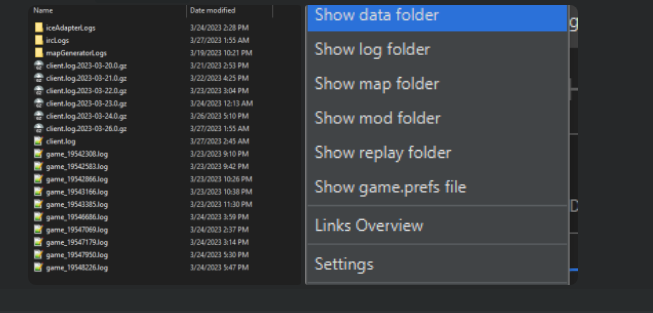
⇉ You can navigate to the folders via the FAF client itself (see attached image)
Overview:
client.log → Contains information about the FAF client itself. Important when client crashes.
game_replay_id.log → Contains information about a certain played game. Important when game crashes.
client.prefs → This JSON config file stores game settings like installation path, preferences, hotkeys, notes, enabled mods, mod and map directories, chat and notification settings, window size and position, and last game type/title.Default log location:
On Windows:
C:\Users\%username%\AppData\Roaming\Forged Alliance Forever\logsOn Linux: ~/.faforever/logs
client.prefs location:
On Windows: C:\Users%username%\AppData\Roaming\Forged Alliance Forever
On Linux: ~/.faforever

Hello! It looks like you're interested in this conversation, but you don't have an account yet.
Getting fed up of having to scroll through the same posts each visit? When you register for an account, you'll always come back to exactly where you were before, and choose to be notified of new replies (either via email, or push notification). You'll also be able to save bookmarks and upvote posts to show your appreciation to other community members.
With your input, this post could be even better 💗
Register Login