My new Linux install is borked!
-
Greetings, I just discovered FAF and would like to play it. I loved playing Supreme Commander and FA. I am very happy to discover there is still active group of gamers.
But since 2016 I only run linux mint on my systems. Currently I am running Linux Mint 21.1 Vera base: Ubuntu 22.04 jammy.
I installed FAF per instructions on the wiki here, but using the script install method, (see link >>> https://github.com/FAForever/faf-linux/blob/master/README.md#setup-instructions)
FAF did not work. So I checked my JVM version. Apparently LM 21.1 ships with version JVM 11. So I used "sudo apt install openjdk-17-jre" per to the wiki instructions. Now it appears I am running "openjdk version "17.0.6" 2023-01-17" when I do a version check.
Note that I did not uninstall JVM ver. 11.
At this time, the FAF client still gives me the same error message and appears to be totally borked.
Please see below a screenshot of the error message I get >>>>
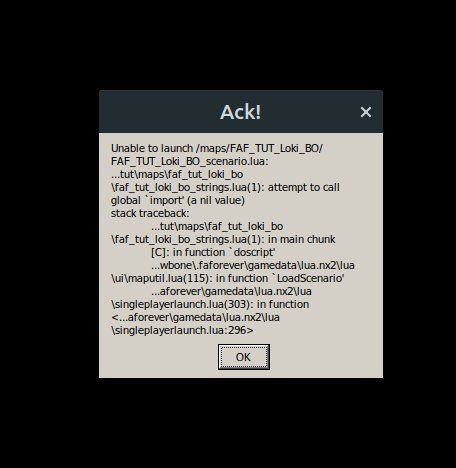
Please find attached a system info file too. sys info.txt
-
UPDATE.... Please note that this problem occurs when I click the "launch tutorials" button under the tutorials tab. I just tried actually play the FAF mod on the play tab and I was able to make a game and play the AI by myself.
I can't seem to run the tutorials.
-
@jawbone Update 002: I was just informed by an admin on discord that the tutorials are a known issue and have been broken since the last update... more or less.

Hello! It looks like you're interested in this conversation, but you don't have an account yet.
Getting fed up of having to scroll through the same posts each visit? When you register for an account, you'll always come back to exactly where you were before, and choose to be notified of new replies (either via email, or push notification). You'll also be able to save bookmarks and upvote posts to show your appreciation to other community members.
With your input, this post could be even better 💗
Register Login