How to Re-install Mods?
-
How do I re-install mods ? do I delete mods folder ?
C:\ProgramData\FAForever\user\My Games\Gas Powered Games\Supreme Commander Forged Alliance\mods
tried searching forum , find nothing , only mod errors
Tried mods - Manage Active mods - reload, does not look like anything happens
-
@dkronie To find the mods folder: in the FAF client, first go to the hamburger button at the top left.
Then you click "show mod folder"
For example, my FAF mod folder is at "Documents\My Games\Gas Powered Games\Supreme Commander Forged Alliance"
This is where FAF saves mods. If you want to remove a mod completely, just delete its folder. Then you can download it again from the FAF mod vault or download it from somewhere else and put it there.
-
-
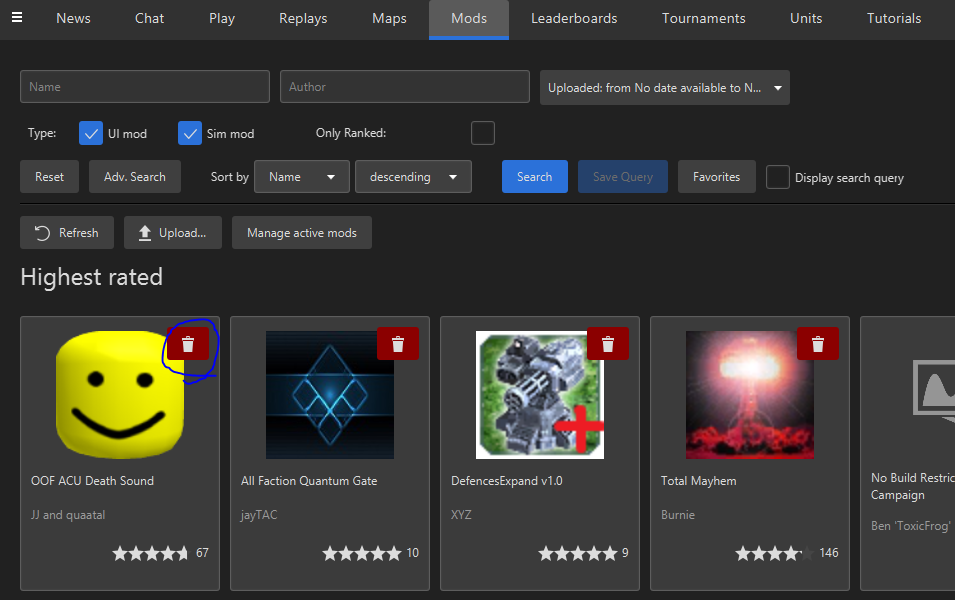
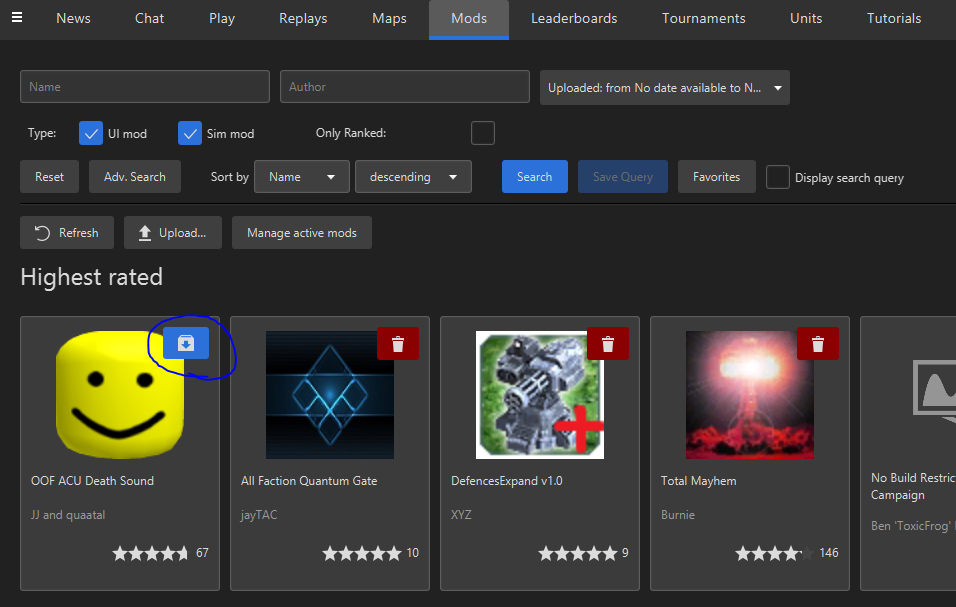
@dkronie From the mods page, you can uninstall and reinstall a mod in 2 clicks (circled below).

Hello! It looks like you're interested in this conversation, but you don't have an account yet.
Getting fed up of having to scroll through the same posts each visit? When you register for an account, you'll always come back to exactly where you were before, and choose to be notified of new replies (either via email, or push notification). You'll also be able to save bookmarks and upvote posts to show your appreciation to other community members.
With your input, this post could be even better 💗
Register Login