Galactic Colossus appears to use Supcom 2 icon
-
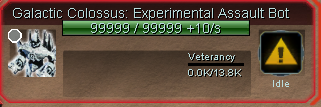
Noticed this earlier today when sandboxing. Does anyone know what could be causing this? Disabled/re-enabled all mods and it still showed up.
-
I've heard that a recent change to FAF causes icons to be pulled into use if they are part of your mods--even INACTIVE mods.
So perhaps you have an inactive mod which includes this GC icon.
-
A few friends did some digging, looks like this change along with specific mods (Warren Battlepack in this case) is causing the main game to get overridden. https://github.com/FAForever/fa/commit/b7d7d209d111052655b0d2ffb2002e160a24d94f
-
This might be a dumb question, but if content from installed mods is automatically being pulled into our icons, how can we avoid having this happen?
"Don't install mods" isn't really a valid answer, because I think the FAF client automatically downloads mods for you under certain circumstances. If you try to watch a replay that involves mods, and the mods are in the vault but you don't have them installed, the client downloads them for you?
-
Wait for the hot fix to come out soon
 ️
️ -
This is a known issue and is solved by this PR, which is awaiting a review.
edit: but thanks for reporting it, if anything else is at odds please do report them too.
-
And @arma473 the friend of @TauNoob1 was right - a similar merge (where it includes textures) is flawed. The new implementation is not - and then the icons can be activated / deactivated accordingly. You will also no longer have this issue where another mod accidentally overrides a base game texture as not all textures will be loaded, just icons and those are loaded in such a way that if they are not enabled then they do not clash with the base game icons.
Hello! It looks like you're interested in this conversation, but you don't have an account yet.
Getting fed up of having to scroll through the same posts each visit? When you register for an account, you'll always come back to exactly where you were before, and choose to be notified of new replies (either via email, or push notification). You'll also be able to save bookmarks and upvote posts to show your appreciation to other community members.
With your input, this post could be even better 💗
Register Login